Your mouth is the controller
- Turn on your camera and sit with your face in the middle.
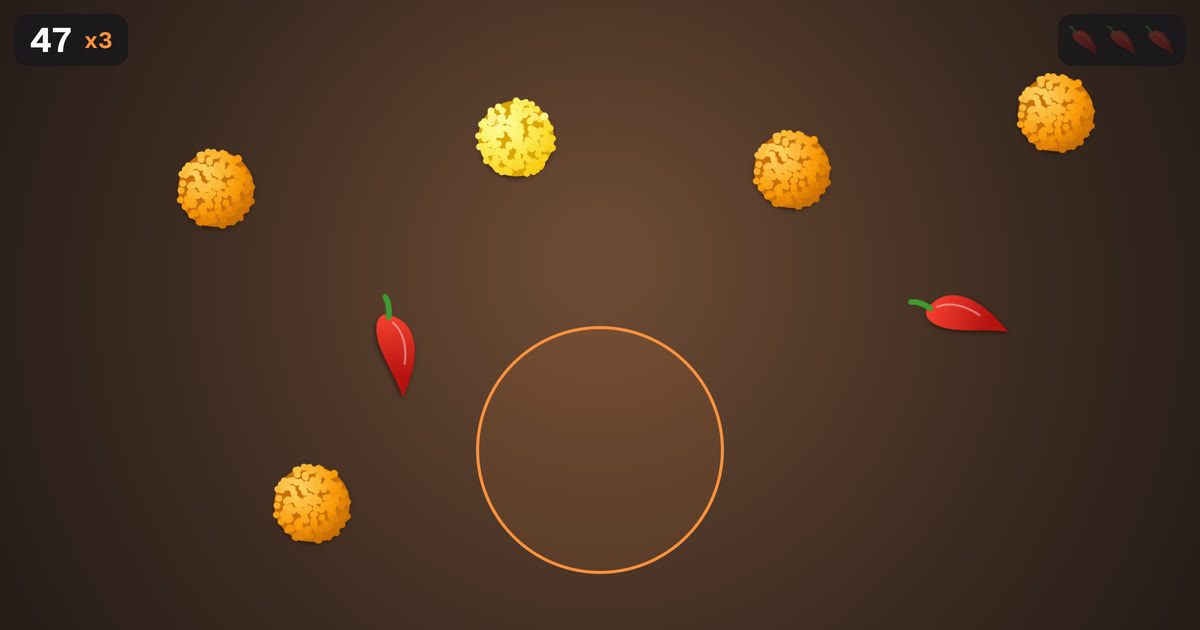
- Open your mouth to catch laddus. Gold ones are worth five.
- Keep it shut for chillies. Three and you're out.
Needs a front camera. The picture is read on your device and never uploaded. First load is about 18 MB.
How to play Chomp
Chomp is a game you play with your face. Press Play, then Turn on camera and allow it when your browser asks. Sit about an arm's length from the screen with your face in the middle of the picture, in a room with light in front of you rather than behind.
Laddus fall from the top. Open your mouth under one to catch it, and keep it shut when a chilli comes past: three chillies and the round is over. The orange ring shows where the game thinks your mouth is, so you can see what it sees.
Scoring: a laddu is worth one point and a gold laddu is worth five. Catch several in a row and your points multiply, so a long streak counts for more than a lucky catch. As the round goes on, laddus fall faster and come in trails and gates.
Tips for a high score
Move your head, not just your mouth: the ring follows your face, so lean to reach a laddu at the side. Close your mouth the moment a chilli is near, then open again straight away, because a streak only breaks when you miss a laddu or catch a chilli.
Good light makes a big difference. If the ring jumps around, turn on a lamp in front of you or move away from a bright window.
Is Chomp free?
Yes. No sign up and nothing to install. It runs in your web browser on phones, tablets and computers with a front camera.
Is my camera picture uploaded?
No. The camera picture is read inside your own browser by a small face tracking model that runs on your device. Nothing from the camera is recorded, sent to us or stored anywhere, and the camera turns off when you close the page.
Why does it take a moment to start?
The first time you play, your browser downloads the face tracker, about 18 MB. After that it's kept on your device, so the game starts quickly next time. On mobile data, Wi-Fi is kinder for that first load.
The camera won't turn on. What can I do?
Check that your browser is allowed to use the camera: look for a camera icon in the address bar, or your phone's settings for the browser. Close other apps that might be using the camera, like a video call, then press Try again.
Does it work on my phone?
It's made for phones as well as computers: a recent browser and a front camera are all it needs. Hold the phone upright and steady, or prop it up so your whole face is in the picture. If it won't start on your phone, tell us which one on the contact page.
Can I save my score?
Your best score is kept in your browser, so it's there when you come back. At the end of a round you can save a photo of the moment to share with friends.